Hot Swappable Keyboards Explained: What It Means & Why It Matters
By Jota Martínez •
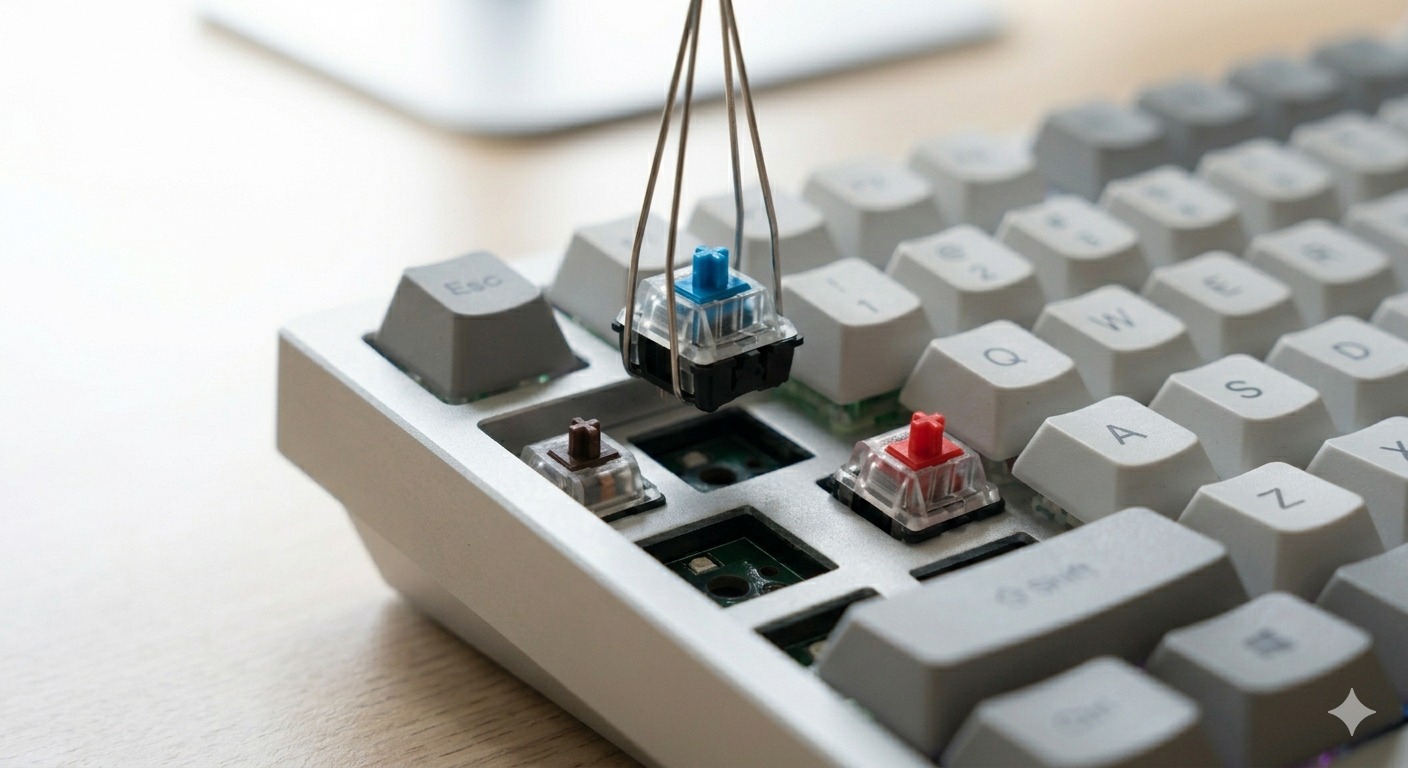
A hot-swappable keyboard lets you remove and replace switches without soldering. You pull a switch out with a switch puller, push a new one in, and the change takes about 30 seconds per key. No heat, no tools, no risk of damaging the PCB. It sounds like a small feature until you realize how much freedom it creates.
This guide explains exactly how hot-swap PCBs work, the difference between socket types, what you can and can't do with a hot-swap board, and which keyboards actually deliver reliable hot-swap sockets.
What Does Hot-Swappable Mean?
Traditional mechanical keyboards have switches soldered directly to the PCB — permanent connections that require desoldering to change. A hot-swap keyboard has switch sockets mounted on the PCB instead of direct solder points. Each socket accepts a switch and holds it with spring tension rather than solder. The switch is held firmly enough for normal use but can be removed with a dedicated switch puller or a bent paperclip.
The term "hot-swappable" means you can swap components while the device is powered — though most people turn off their keyboard before pulling switches, just to be safe. The more important meaning is that you don't need soldering skills or equipment. Anyone can do it.
3-Pin vs 5-Pin Sockets
Mechanical switches come in two pin configurations, and hot-swap PCBs support one or both:
Why Get a Hot-Swap Keyboard?
The practical benefits go beyond just changing switches:
| Experiment freely | Try different switch types — linear, tactile, clicky, silent — without committing. Buy a 10-pack of switches to test before swapping a full set. This is how enthusiasts find their perfect switch. |
| Easy repair | If a switch fails (rare but it happens), swap it in 30 seconds. No soldering iron, no desoldering wick, no risk of lifting PCB pads. Just pull and replace. |
| Lower long-term cost | Instead of buying a new keyboard when you want a different feel, buy $20–40 worth of switches and re-use your existing case, PCB, and keycaps. The expensive parts stay; only the switches change. |
| Progressive upgrading | Start with stock switches, then lube them when you're ready. Later swap to better switches entirely. A hot-swap board grows with your hobby without needing replacement. |
Limitations of Hot-Swap
Hot-swap is excellent, but not without trade-offs:
| Socket wear over time | Hot-swap sockets can wear out after repeated insertions. High-quality sockets (Kailh, Gateron, Mill-Max) last hundreds of swaps. Cheap sockets on budget boards can loosen after 10–20 swaps. Check reviews specifically mentioning socket quality before buying. |
| Pin bending risk | If you insert a switch with bent pins, you can damage the socket or the pin. Always inspect switch pins before inserting and straighten any bent ones with tweezers. This is the most common hot-swap mistake. |
| Slightly higher cost | Hot-swap boards typically cost $10–30 more than equivalent soldered boards at the same build quality. The socket adds manufacturing cost. At higher price points ($80+), hot-swap is nearly standard. |
Best Hot-Swap Keyboards
Here are the most reliable hot-swap boards across price ranges:
| Model | Layout | Socket | Price |
|---|---|---|---|
| Keychron V2 | TKL (87%) | 5-pin Kailh | ~$85 |
| Keychron Q1 Pro | 75% | 5-pin Kailh | ~$170 |
| Monsgeek M1W | Full-size | 5-pin Kailh | ~$110 |
| NuPhy Air75 V2 | 75% | 5-pin Gateron | ~$130 |
| Keychron C3 Pro | TKL (87%) | 3-pin Kailh | ~$40 |
Once you have a hot-swap board, learn how to get the most from it — start with our guide on how to lube switches . Not sure which switches to try? Read the keyboard switches guide . For switch brand comparisons, see Gateron vs Cherry MX.
Frequently Asked Questions
Ready to choose your first (or next) keyboard?
Our complete keyboard buying guide covers hot-swap, layout, switches, and budget — with specific recommendations at every price point.
Read the full keyboard buying guide ?By Jota Martínez • Published on June 15, 2026
Related Articles
What Is a Mechanical Keyboard? The Complete Beginner's Guide
What is a mechanical keyboard? Learn how they work, the anatomy of each part, the three switch types, and how mechanical keyboards differ from membrane.
Keyboard Sizes Explained: 60%, 65%, 75%, TKL, Full-Size and More
Complete guide to keyboard sizes and layouts: 100%, TKL, 75%, 65%, 60%, 40% — what each size includes, what it drops, and which layout is right for you.
Why Are Mechanical Keyboards So Expensive?
Why do mechanical keyboards cost so much? We break down every cost factor — switches, PCBs, cases, keycaps, and why premium keyboards can cost $500+.