Best 65% Mechanical Keyboards 2026: Top 7 Picks
By Jota Martínez • •
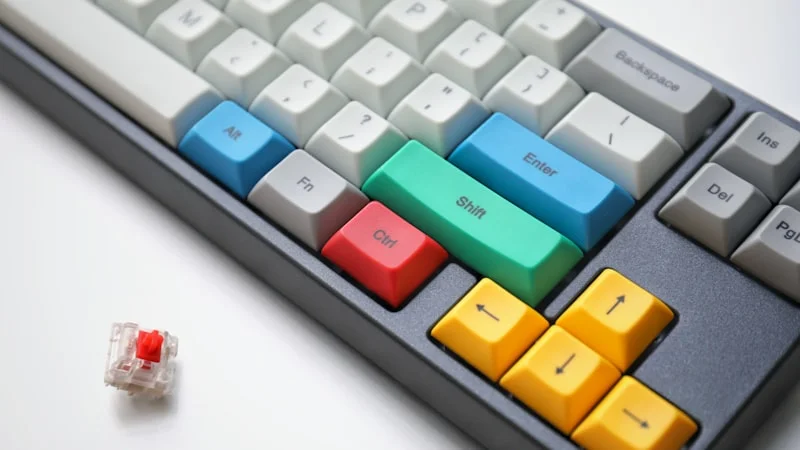
The 65% layout has become the go-to choice for mechanical keyboard enthusiasts in 2026. It strips away the function row and numpad while keeping arrow keys and a compact navigation cluster — the perfect balance between minimalism and usability. Whether you are a gamer craving more mouse space, a programmer who values desk real estate, or a minimalist who still needs arrow keys, the 65% layout delivers.
Our team tested 12 popular 65% mechanical keyboards across all price points. We evaluated build quality, switch feel, stabilizer performance, wireless connectivity, battery life, and software support. This guide presents our top 7 picks, from budget champions to premium endgame boards. New to compact keyboards? Check our keyboard sizes guide to see how 65% compares to other layouts.
Quick Comparison Table
| Model | Layout | Switches | Wireless | Hot-Swap | Price |
|---|---|---|---|---|---|
| Keychron K6 Pro | 65% | Gateron G Pro | Yes (BT) | Optional | ~$99 |
| Royal Kludge RK68 | 65% | RK Brown/Red | Yes (BT + 2.4G) | Yes | ~$49 |
| Keychron Q2 Pro | 65% | Gateron G Pro | No | Yes | ~$199 |
| Wooting 60HE | 60% | Hall Effect | No | Yes | ~$175 |
| Epomaker TH66 | 65% | Gateron Pro | Yes (BT + 2.4G) | Yes | ~$79 |
| NuPhy Air75 | 65% | Gateron LP | Yes (BT) | No | ~$109 |
| Redragon K617 | 65% | Outemu Red | No | No | ~$39 |
#1 — Best Overall 65% Keyboard: Keychron K6 Pro
The Keychron K6 Pro is the definitive 65% keyboard in 2026. At ~$99, it offers Bluetooth 5.1 multi-device connectivity, Gateron G Pro switches pre-lubed from the factory, an optional hot-swap PCB, and native Mac/Windows compatibility. The 65% layout keeps arrow keys and a compact navigation cluster while saving over 35% of desk space versus TKL. **Pros:** Excellent build quality, hot-swap version available, 240-hour battery life, dedicated Mac/Windows toggle. **Cons:** Tall profile may benefit from a wrist rest, no 2.4 GHz dongle included, ABS keycaps on the base model. **Verdict:** The best all-rounder 65% keyboard for typing, gaming, and professional use.
#2 — Best Budget 65% Keyboard: Royal Kludge RK68
The Royal Kludge RK68 proves you do not need to spend $100 for a great 65% keyboard. At ~$49, you get tri-mode connectivity (Bluetooth, 2.4 GHz, USB-C), a hot-swap PCB compatible with 3-pin and 5-pin switches, per-key RGB, and a compact 65% layout with dedicated arrow keys. **Pros:** Unbeatable value, hot-swap sockets, tri-mode wireless, multiple color options. **Cons:** Plastic chassis feels less premium, stock stabilizers need modding, basic companion software. **Verdict:** The perfect first mechanical keyboard or travel backup for anyone who wants 65% functionality at a rock-bottom price.
#4 — Best 65% Gaming Keyboard: Wooting 60HE
While technically a 60% board, the Wooting 60HE earns its place in this guide because its Hall Effect magnetic switches with Rapid Trigger technology are unmatched for competitive gaming. Many 65% enthusiasts pair it with a standalone macropad for the best of both worlds. For pure gaming performance in a compact footprint, the analog actuation and sub-1ms latency are in a league of their own. **Pros:** Analog input, per-key adjustable actuation, Rapid Trigger, tournament-legal. **Cons:** 60% layout has a learning curve, premium price, limited availability. **Verdict:** If competitive gaming is your top priority, the Wooting 60HE is unmatched — consider a separate macropad for productivity.
#5 — Best Hot-Swap 65% Keyboard: Epomaker TH66
The Epomaker TH66 is the hot-swap champion of the 65% world. At ~$79, it features a hot-swap PCB that accepts both 3-pin and 5-pin switches, PBT shine-resistant keycaps, Bluetooth 5.0 plus 2.4 GHz dual wireless, and a compact 65% layout. **Pros:** True hot-swap with 5-pin support, PBT keycaps included, dual wireless modes, solid build for the price. **Cons:** Software is Windows-only, battery life is moderate at 70 hours, no wired mode when wireless is off. **Verdict:** Ideal for hobbyists who love experimenting with different switches in the 65% form factor.
#6 — Best Wireless 65% Keyboard: NuPhy Air75
The NuPhy Air75 redefines what a wireless 65% keyboard can be. At ~$109, its ultra-thin low-profile design (just 16mm thick) paired with Gateron low-profile switches delivers a laptop-like typing experience with mechanical precision. Bluetooth 5.0 connects to 3 devices, and the 4000mAh battery lasts up to 200 hours. **Pros:** Ultra-thin design, excellent low-profile switches, long battery life, Mac-optimized layout. **Cons:** Low-profile switches limit keycap compatibility, no hot-swap on base model, higher price. **Verdict:** The best wireless 65% keyboard for professionals who want a clean, minimal desk setup with Mac-first design.
#7 — Best Entry-Level 65% Keyboard: Redragon K617
The Redragon K617 makes 65% mechanical keyboards accessible to everyone at ~$39. Outemu Red linear switches provide smooth, fast actuation for gaming, while the compact 65% layout keeps arrow keys and saves massive desk space. Per-key RGB with multiple lighting modes rounds out the package. **Pros:** Extremely affordable, genuine mechanical switches, vibrant RGB, compact and lightweight. **Cons:** Non-hot-swap, no wireless option, ABS keycaps prone to shine, basic build quality. **Verdict:** An excellent entry point into the 65% layout for gamers, students, and anyone curious about mechanical keyboards.
How to Choose the Right 65% Keyboard
Before choosing your 65% keyboard, consider these four key decisions:
Is 65% the right size for you?
The 65% layout removes the function row (F1-F12) and numpad while keeping arrow keys and a compact navigation cluster (typically Delete, Page Up/Down). It is about 35% smaller than TKL and 15% smaller than 75%. If you rely heavily on F-keys for IDE shortcuts or macros, consider a 75% layout instead. If you want even smaller, look at 60% boards — but you will lose arrow keys. See our keyboard sizes guide for a full breakdown.
Which switches work best in 65% boards?
65% keyboards accommodate all standard MX-compatible switches. For typing, tactile switches like Gateron Brown or Boba U4T provide satisfying feedback without bottoming out. For gaming, linear switches (Red, Yellow, Silver) offer smooth, fast actuation. Clicky switches (Blue) work great but may disturb others in shared spaces. Hot-swap boards let you try different switches without soldering.
Do you need hot-swap?
If this is your first mechanical keyboard or you want to explore different switch types, hot-swap is highly recommended. It lets you pull and replace switches in seconds without soldering. Most 65% boards now offer hot-swap variants for $10-20 more — a worthwhile investment for long-term flexibility.
Wireless or wired 65%?
Modern Bluetooth 5.0+ 65% keyboards deliver under 10ms latency — imperceptible for typing and casual gaming. For competitive FPS, look for 2.4 GHz dongles with sub-1ms latency. Wireless connectivity also reduces desk clutter, which pairs perfectly with the minimal 65% aesthetic. Our top wireless pick (NuPhy Air75) handles both Bluetooth and 2.4 GHz modes with excellent battery life.
Want to see how 65% compares to 75%? Read our 65% vs 75% comparison for a detailed breakdown of which layout suits your workflow best.
Still unsure which 65% keyboard to choose?
Our complete mechanical keyboard buying guide walks you through every decision: size, switch type, budget, and connectivity options with personalized recommendations.
Read the Complete Buying Guide →Frequently Asked Questions
Related Articles

Best Silent Mechanical Keyboard for Office 2026: 7 Quiet Picks
Looking for the best silent mechanical keyboard for office use? We tested 7 quiet mechanical keyboards with silent switches — from $59 budget picks to $199 premium boards. Perfect for shared offices and WFH setups.
Best 75% Mechanical Keyboards 2026: Top 7 Picks
The 7 best 75% mechanical keyboards of 2026, hands-on tested. From budget picks under $60 to premium wireless — find your perfect compact keyboard.

How to Choose a Mechanical Keyboard: A Complete Step-by-Step Guide
Not sure how to pick a mechanical keyboard? This 2026 guide walks through use case, budget, layout, switches and connectivity in 6 clear steps.