Hall Effect Switches Explained: The 2026 Buyer's Guide
By Jota Martínez •
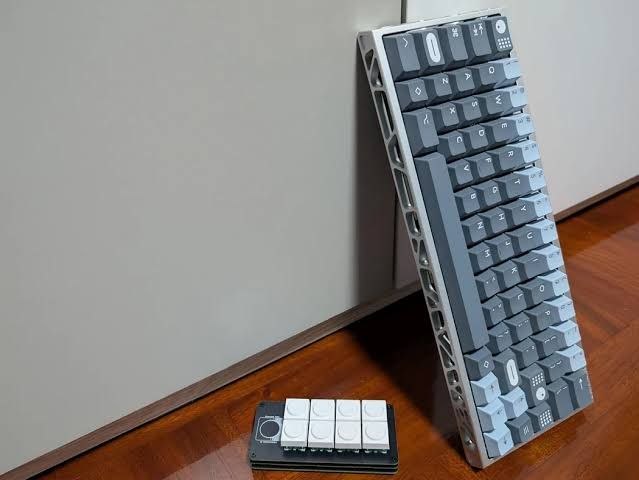
If you've been looking at mechanical keyboards, it's impossible not to have noticed how Hall Effect switches have conquered every corner of the market in 2026. From being a niche curiosity reserved for specialized brands, keyboards with magnetic switches have become the preferred option for gamers, enthusiasts and professionals who seek maximum control over every keystroke.
But let's be honest: among so much technical terminology —Rapid Trigger, adjustable actuation, magnetic sensors— it's easy to get lost. Is the jump really worth it? Are they better than traditional mechanical switches? If you're new to switches, read our complete switch guide first. And which of all the models flooding the market should you choose?
In this complete guide I explain everything you need to know about Hall Effect switches: from their internal workings to the real advantages they offer, through a direct comparison with other technologies and a selection of the best Hall Effect keyboard 2026 models you can buy today.
What are Hall Effect Switches?
Hall Effect switches are a type of keyboard switch that uses the Hall Effect physical principle to detect when you press a key. Unlike conventional mechanical switches, which depend on physical contact between two metal pieces to close the electrical circuit, magnetic switches have no parts that touch each other.
Instead, each switch contains a magnet and a sensor. When you press the key, the magnet moves and the sensor detects the change in the magnetic field. That's it. No friction, no wear from friction, no metallic bounce.
This technology is not new: it has been used for decades in industrial and aerospace environments for its extreme reliability. What has changed in recent years is that manufacturers like Wooting, Keychron, Glorious and SteelSeries have managed to miniaturize and optimize these sensors to integrate them into desktop keyboards at competitive prices.
How do magnetic switches work?
To understand why Hall Effect switches are revolutionizing the keyboard world, it's worth comparing their operation with that of a traditional mechanical switch.
How a traditional mechanical switch works
In a standard mechanical switch (like the Cherry MX, Gateron or Kailh we analyze in our switch guide), the process is both mechanical and electrical:
- You press the key and the stem goes down.
- A flexible metal leaf deforms.
- As it deforms, two metal contacts touch and close the circuit.
- The keyboard sends the signal to the computer.
- When you release, the contacts separate and the signal stops.
The problem: that physical contact generates wear over time, debounce that adds latency, and a fixed actuation point that you cannot modify.
How a Hall Effect switch works
In an adjustable actuation keyboard with Hall Effect technology, the process is purely magnetic:
- You press the key and the stem goes down.
- A magnet integrated in the stem moves along with it.
- A Hall sensor on the PCB detects the variation in the magnetic field.
- When the magnetic signal crosses a programmable threshold, the keyboard registers the keystroke.
- Upon release, when the signal falls below another threshold, the key is released.
The magic here is that this "programmable threshold" is decided by you. You can configure at what exact depth (measured in millimeters) you want each key to actuate. Some keyboards allow adjustments of 0.1 mm by 0.1 mm, giving you micrometric control over your typing or gaming experience.
In addition, since there is no physical contact, wear is practically non-existent. A Hall Effect switch can withstand hundreds of millions of keystrokes without degrading, compared to the typical 50-100 million of a good mechanical switch.
Advantages of Hall Effect switches
The explosive popularity of keyboards with magnetic switches is no coincidence. They bring concrete advantages that, for certain user profiles, represent a radical change.
Rapid Trigger: the speed that makes the difference
Rapid Trigger is, without a doubt, the killer feature that has catapulted Hall Effect keyboards to gamer stardom. In a traditional mechanical switch, once you pass the actuation point, the key must rise completely to the rest position before it can be registered again. This means that, if you're strafing in a shooter or making rapid presses in a MOBA, there is "dead time" between releasing and being able to press again.
With the rapid trigger keyboard, the system detects not only when you go down, but also when you start to go up, however small the movement. You can configure the key to reactivate when you release it by just a few tenths of a millimeter, practically eliminating any mechanical latency between keystrokes.
For competitive gaming where milliseconds matter, this is a tangible advantage. It's not placebo: the difference between a standard mechanical switch and one with optimized Rapid Trigger can be around 10-20 ms on repeated presses, something crucial in high-level play.
Adjustable actuation: a keyboard tailored to you
The ability to configure the actuation point of each key individually transforms the keyboard into a truly customizable tool. You can:
- Lower the actuation to 0.1 mm for ability keys in games, achieving instant responses.
- Raise the actuation to 3.0 mm or more for the Windows key or Caps Lock, avoiding accidental presses.
- Create profiles according to the game or application: one profile for Valorant with ultra-fast actuation on WASD, another for typing with deeper and more comfortable actuation.
This flexibility is impossible to achieve with traditional mechanical switches, where the actuation point is determined by the physics of the switch and cannot be altered.
Superior durability: goodbye to contact wear
As we've seen, by not having physical contact between metal parts, Hall Effect switches eliminate wear from friction and oxidation. The theoretical lifespan far exceeds 100 million keystrokes, and most importantly: the feel and performance do not degrade over time.
In traditional mechanical switches, it's normal that after years of intensive use the leaf weakens, the actuation point shifts or the dreaded "double press" (chattering) appears. With magnetic switches, these problems simply don't exist.
Lower latency
The absence of mechanical bounce (debounce) allows Hall Effect keyboards to send the keystroke signal almost instantly. While a mechanical switch needs a debounce algorithm of 5-10 ms to avoid false registrations from the metal contact bounce, the magnetic sensor offers a clean and stable reading from the first millisecond.
Combined with good firmware implementation and high polling rate (1000 Hz or more), a rapid trigger keyboard can offer a total input latency of less than 1 ms, something that only optical switches can match.
Disadvantages and considerations before buying
Not everything is advantages. Hall Effect switches have limitations that you should evaluate before investing in one.
Price: still a considerable investment
Although prices have dropped significantly in 2026, a good keyboard with magnetic switches is still more expensive than its mechanical equivalent. Mid-range models start around €120-150, while premium options with aluminum construction and advanced customization can easily exceed €250.
If you're looking for an affordable keyboard to get started, perhaps the best mechanical keyboards of 2026 are a more sensible option for now.
Compatibility with existing keycaps
Here's good news: most Hall Effect keyboards use the same MX cross mount system as standard mechanical switches. This means your favorite keycaps (GMK, Drop, Akko, etc.) should fit without problems.
However, there are exceptions. Some models, especially low-profile ones or very personalized compact designs, may use non-standard stems. If you have an expensive and specific set of keycaps, verify compatibility before buying.
Learning curve
A keyboard with adjustable actuation is a powerful tool, but also complex. Configuring profiles, adjusting actuation points, calibrating Rapid Trigger, understanding the management software... all this requires time and patience.
If you're the type who unplugs the keyboard from the box and wants it to work without further ado, the learning curve may frustrate you. Hall Effect keyboards shine when you configure them to your taste; if you have no interest in "tinkering", you may not get their full potential.
Less tactile variety than mechanical switches
The offering of Hall Effect switches has grown a lot, but still doesn't match the incredible diversity of the mechanical world. In the MX ecosystem you can find linear, tactile, clicky, of different weights, with different stem materials, with short or long pre-travel... thousands of variations.
In contrast, most current magnetic switches are linear. There are some exceptions with tactile profiles simulated through software, but the physical feel of a good tactile mechanical switch (like a Holy Panda or a Boba U4T) has no magnetic equivalent yet.
If what you value most is the tactile and sound experience of a traditional mechanical switch, the jump to Hall Effect may feel like a step back in that specific aspect.
Hall Effect vs Mechanical vs Optical: complete comparison
This table summarizes the key differences between the three most popular switch technologies in 2026:
| Characteristic | Hall Effect (Magnetic) | Traditional Mechanical | Optical |
|---|---|---|---|
| Characteristic | Magnetic sensor (no contact) | Metal contact | Light beam interruption |
| Characteristic | Adjustable (software) | Fixed (switch physics) | Fixed or semi-adjustable |
| Characteristic | Yes, native | No | Yes, in some models |
| Characteristic | >100 million | 50-100 million | ~100 million |
| Characteristic | Very low (<1 ms) | Medium (5-10 ms debounce) | Very low (<1 ms) |
| Characteristic | Non-existent | Moderate (metal contact) | Very low |
| Characteristic | Mainly linear | Extensive (linear, tactile, clicky) | Limited |
| Characteristic | MX standard (most) | MX standard | MX standard (most) |
| Characteristic | Mid-High | Low-Mid | Mid |
| Characteristic | Very high (per-key) | Limited (switch swap) | Medium |
Quick verdict: If you're looking for maximum customization, extreme durability and Rapid Trigger advantages for gaming, Hall Effect switches are the best option in 2026. If you prioritize tactile variety, sound and an affordable price, traditional mechanicals are still unbeatable. Optical switches are an interesting alternative with low latency, but their ecosystem is more limited and customization doesn't reach the level of magnetic ones.
The Best Hall Effect Keyboards of 2026
The market for keyboards with magnetic switches has exploded this year. These are the models that stand out for build quality, software and overall value.
Keychron Q1 HE
The Keychron Q1 HE is probably the best option for enthusiasts who want a Hall Effect keyboard without giving up the custom experience. With its solid aluminum chassis, gasket mount design and full compatibility with MX keycaps and switches, the Q1 HE proves that Keychron has perfectly understood the enthusiast audience.
Its software allows adjusting the actuation point per key, configuring Rapid Trigger with great precision and saving profiles in internal memory. The build quality is exceptional and the sound, thanks to the gasket mount, is deep and dampened.
Ideal for: Users who want a premium, customizable keyboard with the best possible typing experience in 75% format.
Keychron K2 HE
If you prefer a more compact and wireless format, the Keychron K2 HE brings the same magnetic technology to a lighter chassis with Bluetooth connectivity. It maintains actuation adjustment and Rapid Trigger, although with slightly more simplified software than the Q1 HE.
Ideal for: Those who need portability and want Hall Effect technology without taking up the entire desk.
Glorious GMMK 3 PRO HE
Glorious has taken a giant step with the GMMK 3 PRO HE. Its modular approach allows you not only to change keycaps, but also to experiment with different sensor configurations. The Glorious Core software is intuitive and offers total control over the actuation point and Rapid Trigger.
The build is solid, with polycarbonate or aluminum chassis options, and the Glorious modding community is huge, which means you can improve and customize it for years.
Ideal for: Modders and enthusiasts who want a versatile platform to experiment with.
Wooting 60HE+
Wooting was a pioneer in popularizing Hall Effect keyboards for gaming, and the 60HE+ remains a reference in 60% format. Its implementation of Rapid Trigger is among the most polished on the market, and the Wootility software is a gold standard in terms of ease of use and power.
Although its construction is simpler (plastic, without gasket mount), pure gaming performance is hard to beat. In addition, its 60% format is perfect for those who prioritize desk space and mouse movement.
Ideal for: Competitive gamers who seek maximum performance in the most compact possible format.
Nuphy Air 96 HE
Nuphy has surprised this year with the Air 96 HE, a low-profile keyboard that integrates magnetic switches in an ultra-thin and elegant design. It's one of the few Hall Effect options that really works well for office and productivity environments without drawing too much attention.
The quality of its low-profile keycaps is remarkable, and triple connectivity (wired, Bluetooth, 2.4 GHz) makes it very versatile.
Ideal for: Professionals who want Hall Effect technology in a work environment without giving up sober design.
SteelSeries Apex Pro (reference)
Although it has several years on the market, the SteelSeries Apex Pro remains an obligatory reference when we talk about keyboards with adjustable actuation. It was one of the first to popularize the concept, and its OLED wheel to adjust the actuation point on the fly is still a brilliant interface.
In 2026, its OmniPoint switches have been surpassed in latency and precision by the new generations of Wooting or Keychron, but it remains a solid option if you find it on sale.
Ideal for: Those who value ease of use and quick adjustments without needing complex software.
Is a rapid trigger keyboard worth it for gaming?
If you play competitive titles —Valorant, Counter-Strike 2, Apex Legends, osu!, Rocket League— the answer is a resounding yes. Rapid Trigger provides an objective mechanical advantage that cannot be achieved in any other way.
In tactical shooters, the ability to stop your movement instantly when releasing a direction key (instead of waiting for the switch to fully rise) translates to superior counter-strafing precision. In rhythm games or MOBAs where you press keys repeatedly at high speed, eliminating the dead time between presses allows for faster and more consistent actions.
Even in less frenetic games, the ability to configure ability keys with ultra-short actuation (0.1 mm) means your reactions translate into almost instantaneous actions.
The only caveat: if you play casually and don't care about ranked or competition, you might not notice the difference enough to justify the extra cost. But if you take your performance seriously, a Hall Effect keyboard is, in 2026, practically standard equipment in high-level play.
Are adjustable actuation keyboards useful for productivity?
Here the answer is more nuanced. For intensive writing, programming or video editing, the benefits of Hall Effect switches are not as dramatic as in gaming, but they do exist.
The most valuable feature is the ability to prevent typing errors. You can configure problematic keys (like the spacebar or Enter key) with slightly deeper actuation, avoiding accidental presses. You can also create productivity profiles where certain combinations require less travel to execute faster.
In addition, extreme durability is a factor to consider if you spend 8 hours a day typing. A Hall Effect keyboard will maintain its feel and performance years after a mechanical one starts showing signs of wear.
However, if your absolute priority is the tactile and sound experience of typing —that satisfying bump of a tactile switch or the crisp clack of a well-lubed linear— traditional mechanical switches still offer a much richer palette of sensations.
Frequently Asked Questions (FAQ)
Conclusion: Should you buy a Hall Effect keyboard in 2026?
Hall Effect switches have gone from being a curiosity to becoming the dominant technology in the gaming and enthusiast keyboard segment. In 2026, the offering is mature enough that there are excellent options for almost all profiles: from the demanding modder with the Keychron Q1 HE to the competitive gamer with the Wooting 60HE+, passing through the professional with the Nuphy Air 96 HE.
If you play competitive titles, a rapid trigger keyboard with adjustable actuation offers objective advantages that you won't find in any other technology. If you're a keyboard enthusiast and enjoy customizing every detail, magnetic switches open up a world of possibilities that mechanical switches cannot match.
However, if your budget is tight, you play casually or value above all the tactile and sound variety of traditional mechanical switches, there's no rush. Mechanical switches are still excellent, and a good mechanical keyboard will serve you perfectly for years.
But if you're thinking of upgrading your setup and want the latest, the most durable and the maximum competitive advantage, 2026 is the perfect year to make the jump to Hall Effect switches.
Want to build your own custom keyboard? Check out our guide to learn the fundamentals that also apply to the Hall Effect world.
Related Articles
Complete Guide to Keyboard Switches (2026)
Everything about mechanical keyboard switches: how they work, all switch types, key specs, top brands (Cherry, Gateron, Kailh), and how to choose the right one.
Linear vs Tactile vs Clicky Switches: Which Is Best?
Linear, tactile, or clicky switches — what's the real difference? A practical breakdown of all three switch types with top picks for gaming, typing, and office use.
How Mechanical Keyboard Switches Work: Inside Every Keystroke
Learn exactly how mechanical keyboard switches work: the 4 components, what happens inside each keystroke, and how linear, tactile and clicky switches differ.
Still deciding?
Compare the three main switch types to find what suits your style.
Linear vs Tactile vs Clicky Switches