Best 65% Mechanical Keyboards 2026: Top 7 Picks
By Jota Martínez • •
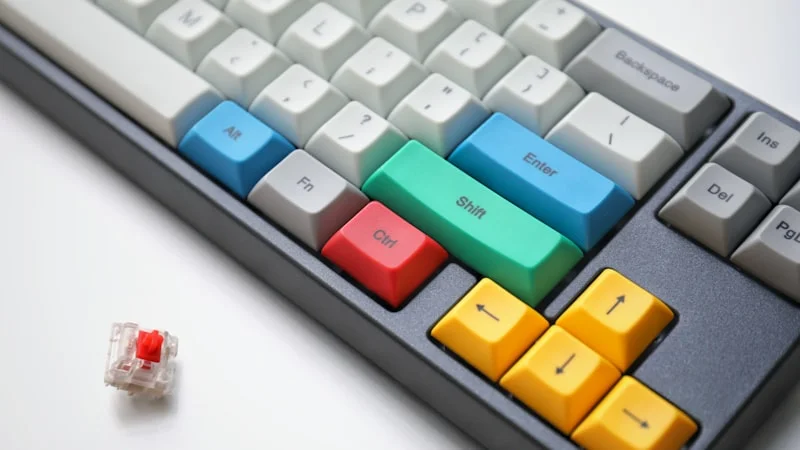
The 65% layout has become the go-to choice for mechanical keyboard enthusiasts in 2026. It strips away the function row and numpad while keeping arrow keys and a compact navigation cluster — the perfect balance between minimalism and usability. Whether you are a gamer craving more mouse space, a programmer who values desk real estate, or a minimalist who still needs arrow keys, the 65% layout delivers.
How we chose: we shortlisted popular 65% boards across every price point and compared them using manufacturer specifications, hands-on reviews from established keyboard reviewers and long-term community feedback on build quality, switch feel, stabilisers, wireless connectivity, battery life and software. We have not lab-tested every board ourselves. The result is 7 picks, from budget champions to premium endgame boards. New to compact keyboards? Check our keyboard sizes guide to see how 65% compares to other layouts.
Quick Comparison Table
| Model | Layout | Switches | Wireless | Hot-Swap | Price |
|---|---|---|---|---|---|
| Keychron K6 Pro | 65% | Keychron K Pro | Yes (BT) | Yes | ~$99 |
| Royal Kludge RK68 | 65% | RK (linear / tactile) | Yes (BT) | Yes | ~$50 |
| Keychron Q2 Pro | 65% | Keychron K Pro | Yes (BT) | Yes | ~$189 |
| Keychron Q2 HE 8K | 65% | Hall Effect (magnetic) | No | Yes (magnetic only) | ~$199 |
| EPOMAKER x AULA F65 | 65% | AULA (pre-lubed) | Yes (BT + 2.4G) | Yes | ~$60 |
| NuPhy Halo65 V2 | 65% | NuPhy (linear / tactile) | Yes (BT + 2.4G) | Yes | ~$129 |
| Redragon K709 | 65% | Redragon linear (pre-lubed) | No | Yes | ~$45 |
#1 — Best Overall 65% Keyboard: Keychron K6 Pro
The Keychron K6 Pro is our best all-round 65% keyboard. At ~$99 it combines Bluetooth 5.1 multi-device connectivity (plus wired USB-C), a hot-swap PCB, QMK/VIA programmability and native Mac/Windows support with Mac keycaps in the box. The 65% layout keeps arrow keys and a compact navigation column while freeing up plenty of desk space compared with a TKL. Pros: Hot-swap on every version, QMK/VIA, multi-device Bluetooth, dedicated Mac/Windows toggle. Cons: Tall profile benefits from a wrist rest, no 2.4 GHz dongle, plastic case. Verdict: The most versatile 65% keyboard for typing, light gaming and professional use.
#2 — Best Budget 65% Keyboard: Royal Kludge RK68
The Royal Kludge RK68 proves you do not need to spend $100 for a good 65% keyboard. For around $50 you get Bluetooth (up to three devices) plus wired USB-C, a hot-swap PCB that accepts 3-pin and 5-pin switches, and a compact 68-key layout with dedicated arrow keys. Pros: Excellent value, hot-swap sockets, multi-device Bluetooth, many colour and switch options. Cons: Plastic chassis, stock stabilisers benefit from tuning, modest battery (1,450 mAh) and basic software; check the listing, as some versions add a 2.4 GHz dongle and others do not. Verdict: A great first mechanical keyboard or travel backup with 65% functionality at a low price.
#4 — Best 65% Gaming Keyboard: Keychron Q2 HE 8K
The Keychron Q2 HE 8K is a genuine 65% board built for gaming. Its Hall Effect magnetic switches offer adjustable actuation from 0.1 to 3.35 mm, Rapid Trigger, Snap Click and Last Key Priority, and the wired connection runs at an 8,000 Hz polling rate. The CNC-aluminium body, OSA doubleshot PBT keycaps and knob make it feel premium too. Pros: Rapid Trigger and per-key actuation, 8K polling, hot-swappable magnetic switches, settings stored on board via the web-based Keychron Launcher. Cons: Wired only, Hall Effect boards need magnetic switches (standard MX switches will not work), premium price. Verdict: The 65% pick for competitive gamers who still want arrow keys.
#5 — Best Hot-Swap 65% Keyboard: EPOMAKER x AULA F65
The EPOMAKER x AULA F65 is the hot-swap champion of the budget 65% world. For around $60 you get a gasket-mounted 67-key board with a hot-swap PCB, a flexible polycarbonate plate, five layers of sound-dampening material, pre-lubed stabilisers and tri-mode connectivity (Bluetooth, 2.4 GHz and wired) with a 4,000 mAh battery. Pros: Deep, "thocky" sound out of the box, tri-mode wireless, easy switch swapping, excellent value. Cons: Plastic case, software is basic, the soft PC plate is not for everyone. Verdict: Ideal for hobbyists who want to experiment with switches without spending much.
#6 — Best Wireless 65% Keyboard: NuPhy Halo65 V2
The NuPhy Halo65 V2 is our pick for a wireless 65% board. It connects over Bluetooth, 2.4 GHz (1,000 Hz polling) or USB-C, remembers up to four wireless devices, and adds a gasket mount, PBT keycaps, a hot-swap PCB and QMK/VIA support that works on Mac, Windows and Linux. NuPhy quotes roughly 180 hours of battery life with the backlight off from its 4,000 mAh cell. Pros: Tri-mode connectivity, QMK/VIA, gasket mount, polished design. Cons: Pricier than budget rivals, full-height profile needs a wrist rest for some users. Verdict: The best wireless 65% keyboard for people who switch between several computers and want a premium feel.
#7 — Best Entry-Level 65% Keyboard: Redragon K709
The Redragon K709 makes the 65% layout accessible to almost everyone at around $45. This wired 68-key board brings features rarely seen at this price: a gasket structure, three layers of noise-dampening foam, a hot-swap PCB and pre-lubed linear switches, plus RGB lighting and macro software. Pros: Very affordable, gasket mount and foam, hot-swap, dedicated arrow keys. Cons: Wired only, plastic build, software is basic. Verdict: An excellent entry point into the 65% layout for gamers, students and anyone curious about mechanical keyboards.
How to Choose the Right 65% Keyboard
Before choosing your 65% keyboard, consider these four key decisions:
Is 65% the right size for you?
The 65% layout removes the function row (F1-F12) and numpad while keeping arrow keys and a compact navigation cluster (typically Delete, Page Up/Down). It is about 35% smaller than TKL and 15% smaller than 75%. If you rely heavily on F-keys for IDE shortcuts or macros, consider a 75% layout instead. If you want even smaller, look at 60% boards — but you will lose arrow keys. See our keyboard sizes guide for a full breakdown.
Which switches work best in 65% boards?
65% keyboards accommodate all standard MX-compatible switches. For typing, tactile switches like Gateron Brown or Boba U4T provide satisfying feedback without bottoming out. For gaming, linear switches (Red, Yellow, Silver) offer smooth, fast actuation. Clicky switches (Blue) work great but may disturb others in shared spaces. Hot-swap boards let you try different switches without soldering.
Do you need hot-swap?
If this is your first mechanical keyboard or you want to explore different switch types, hot-swap is highly recommended. It lets you pull and replace switches in seconds without soldering. Most 65% boards now offer hot-swap variants for $10-20 more — a worthwhile investment for long-term flexibility.
Wireless or wired 65%?
Modern Bluetooth 65% keyboards add only a few milliseconds of latency — imperceptible for typing and casual gaming. For competitive FPS, look for a 2.4 GHz dongle or play wired. Wireless also reduces desk clutter, which suits the minimal 65% look. Our wireless pick, the NuPhy Halo65 V2, offers Bluetooth, 2.4 GHz and wired modes.
Want to see how 65% compares to 75%? Read our 65% vs 75% comparison for a detailed breakdown of which layout suits your workflow best.
Still unsure which 65% keyboard to choose?
Our complete mechanical keyboard buying guide walks you through every decision: size, switch type, budget, and connectivity options with personalized recommendations.
Read the Complete Buying Guide →Frequently Asked Questions
Related Articles
Black Friday Mechanical Keyboard Deals 2026: What's Worth Buying
Black Friday mechanical keyboard deals 2026: 10 boards from our guides worth watching, typical prices, what a good deal looks like and how to spot fake deals.

Best Silent Mechanical Keyboard for Office 2026: 7 Quiet Picks
Best silent mechanical keyboard for office use in 2026: 7 quiet picks with silent switches, from budget to premium, compared by noise, layout and wireless.
Best 75% Mechanical Keyboards 2026: Top 7 Picks
The 7 best 75% mechanical keyboards of 2026: budget, wireless, Hall Effect gaming and premium boards, compared by switches, hot-swap, connectivity and price.